
The Radio Station Problem Nobody Talks About Out Loud
You know the sound. Dead air between songs. A generic sweep that sounds like it came from a template pack in 2009. A station ID that hasn’t changed since the Bush administration.
It’s not because station owners don’t care. It’s because hiring real voice talent is expensive, scheduling is a nightmare, and automation software – for all its power – has never been great at sounding human.
That’s changing. Fast.
AI announcers are now being used by internet radio stations and traditional AM/FM broadcasters to deliver personalized, professional on-air talent — around the clock, for a fraction of what it used to cost. And for stations running RadioDJ, there’s now a purpose-built solution that takes the entire process further than anything else on the market.
This post covers everything: what AI announcers actually are, what they can do for your station, and why CS Radio Announcers has become the go-to tool for station operators who are serious about sounding professional.
What Is an AI Radio Announcer?
An AI radio announcer is software that uses artificial intelligence – typically large language models and text-to-speech engines – to generate and deliver spoken on-air content automatically.
Unlike pre-recorded sweepers or static voice tracks, AI announcers can:
- Generate fresh, dynamic content in real time rather than replaying the same recordings
- Be customized with a name, personality, voice, and language
- Respond to scheduling logic – going on air only during assigned days and time slots
- Reference station-specific information like your station name, shows, sponsors, and slogans
- Announce songs, weather, events, and motivational content without manual scripting
Think of it as having a staff of voice personalities on your payroll who never call in sick, never ask for a raise, and always stay on brand.
Who Is Using AI Announcers?
The adoption curve has moved beyond early experimenters. Today you’ll find AI announcers being deployed by:
- Internet radio stations looking to compete with larger operations on a lean budget
- AM/FM broadcasters reducing voice talent costs while maintaining a live-sounding format
- Gospel and Christian radio stations that want on-air personalities who can read scripture, give devotionals, and stay theologically consistent
- Niche format stations (urban, reggae, country, talk) that need announcers who speak their audience’s language – literally and culturally
- One-person operations running fully automated streams who want it to sound like a real team is behind the mic
If your station runs 24/7 and you’re still relying on the same six sweepers from three years ago, AI announcers are worth a serious look.
What Can an AI Announcer Actually Say?
This is where most people underestimate the technology. AI announcers aren’t limited to “You’re listening to WXYZ.” A properly configured AI announcer can deliver:
- Song announcements – artist, title, and contextual commentary
- Back-announces – referencing what just played before the break
- Show introductions and outros – with your show name and host personality baked in
- Sponsor reads – customized promotional copy for advertisers
- Event announcements – upcoming station or community events
- Weather – current conditions relevant to your market
- Motivational quotes – daily or rotating content to engage listeners
- Bible scriptures – ideal for gospel and Christian formats
- Thought of the day – editorial content that gives your station a point of view
- Listener encouragement – the kind of warm, personal-feeling content that builds loyalty
The difference between a mediocre AI announcer and a great one comes down to how much of your station’s identity you can actually inject into it. That’s where CS Radio Announcers pulls ahead.
CS Radio Announcers: Built Specifically for RadioDJ & SAM Pro Station Owners
Most AI voice tools are built for podcasters, content creators, or enterprise media companies. CS Radio Announcers was built for one specific use case: station operators running RadioDJ or Sam Pro who want professional AI on-air talent that integrates seamlessly with their existing setup.
Here’s what that looks like in practice.
25 Fully Customizable Staff Members
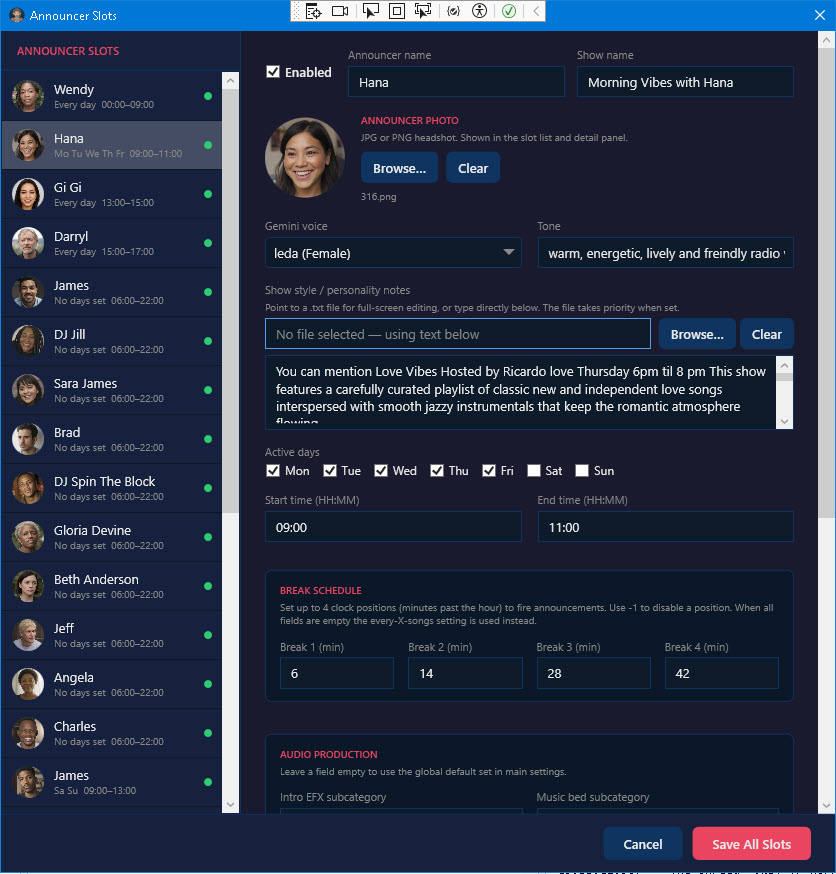
You don’t get one generic voice. You get 25 individual announcer slots, each one configurable as a distinct personality. Set a different name, voice, language, and show assignment for each. Build out a full morning team, an afternoon drive personality, a late-night host – your station, your cast.
Deep Per-Announcer Customization
For each announcer you can set:
- Name – they introduce themselves by name on air
- Voice and language – native language support for multilingual stations
- Show name – each announcer owns their time slot
- Personality – warm, energetic, devotional, authoritative, conversational
- Show instructions – specific guidance for how that announcer behaves in their slot
- Intro, music bed, and outro categories – full control over the audio flow around their breaks
- Day and time on duty – precise scheduling so the right personality is always on
Global Station Settings
Alongside per-announcer settings, you configure the station-wide context that every announcer draws from:
- Station name and time zone
- Multiple station slogans – rotated automatically
- Global announcer instructions – rules and brand standards every personality follows
- Additional station content – background material, format notes, advertiser info, community context
The result is announcers who sound like they actually know your station – because you’ve taught them.
The Show Bible Approach
CS Radio Announcers uses what’s essentially a show bible architecture. Your global settings define the station’s identity. Your per-announcer settings define each personality. Every break your AI talent goes on air, they’re drawing from both layers – sounding consistent, specific, and on-brand in a way that generic TTS tools simply can’t replicate.
Why RadioDJ & Sam Pro Station Owners Specifically Benefit
RadioDJ is one of the most capable free radio automation platforms available. It handles scheduling, playlists, rotation logic, and live assist with professional-grade precision. What it doesn’t do natively is generate dynamic, personalized voice content between tracks. The same is also true with other paid radio automation platforms like Sam Pro, RadioBoss, Station Playlist, etc..
CS Radio Announcers fills that gap exactly. It’s designed to run alongside RadioDJ or Sam Pro, triggering announcer breaks at the right moments and feeding audio output back into your broadcast chain. No complicated middleware. No retrofitting a tool that wasn’t designed for your workflow.
If you’re already on RadioDJ or Sam Pro, the integration is the point.
How to Set Up AI Announcers for Your RadioDJ or Sam Pro Station
This is the section that tells you whether this tool is actually right for your setup – because the best way to answer that question is to walk you through exactly what the process looks like from day one.
Step 1: Install and License the Software
Download CS Radio Announcers for your platform from CarterScripts.com and run the installer on the same Windows machine where RadioDJ or Sam Pro lives. After installation, enter your license key to activate. The app opens to a clean settings dashboard – no command line, no config files to hand-edit.
Is this right for me check: If you’re running RadioDJ or Sam Pro on Windows (which is the standard setup), there’s nothing unusual about your environment. This step takes minutes.
Step 2: Configure Your Station Identity
Before you touch a single announcer, you fill out your global station settings. This is the foundation every announcer draws from – and it’s where the tool starts to feel different from anything generic.
You’ll enter:
- Your station name – exactly as you want it spoken on air
- Your station time zone – so time-of-day references are always accurate
- Multiple station slogans – the tool rotates through them automatically so breaks don’t repeat
- Global announcer instructions – brand rules, content guidelines, tone standards that apply to every personality
- Additional station content – this is the show bible layer. Add sponsor details, upcoming events, community context, format notes, anything you want your announcers to know and reference
Is this right for me check: If you’ve ever written an about page for your station, you already have most of this. It takes one focused session to input it well.
Step 3: Build Your Announcer Staff
Now you populate your 25 announcer slots. You don’t have to fill all 25 – start with however many time slots your format actually calls for and build from there.
For each announcer you configure:
- Name – your morning host, afternoon personality, late night voice, weekend fill-in
- Voice and language – select from available TTS voices; multilingual stations can assign native-language voices per slot
- Show name – the named program that announcer hosts
- Personality description – this shapes how the AI writes and delivers content in that slot. “Warm and devotional” produces very different breaks than “high-energy and upbeat”
- Show-specific instructions – anything unique to that slot: always promote the evening show, always mention the prayer line, focus on encouraging working moms
- Days and hours on duty – set the exact schedule so the right voice is always on at the right time
- Intro, music bed, and outro categories – link to your RadioDJ audio categories so the announcer break sounds complete, not bare
Is this right for me check: Think about your station’s current format. Do you have distinct dayparts? Different listener moods at different times of day? If you’ve ever wished for a morning host who sounds different from your overnight automation, this is exactly what this step builds.
Step 4: Set Up Your RadioDJ or Sam Pro Integration
CS Radio Announcers connects to your running RadioDJ or Sam Pro instance. You configure the API connection settings – RadioDJ’s local API port and authentication – so the two applications can communicate. Once connected, CS Radio Announcers can see what’s playing, pull song data for announcements, and trigger breaks in sync with your automation.
Is this right for me check: If you’ve enabled RadioDJ’s API for any other purpose (most active operators have), this step requires minimal additional setup. If you haven’t touched the API settings before, the documentation walks you through it clearly.
Step 5: Run It and Listen
This is the step most walkthroughs skip – and it’s the most important one. Once everything is configured, let it run on your actual stream and listen.
Not just for technical correctness. Listen the way your audience does. Does the morning host sound like she belongs in that time slot? Does the evening announcer reference your station slogans naturally? Does the back-announce after a song set feel like a real personality said it?
CS Radio Announcers learns your station content day by day, drawing on your global settings and per-announcer instructions to keep breaks fresh. The more complete your station content layer is, the better every break gets.
Is this right for me check: Give it a full broadcast day before you evaluate. First breaks are good. Day-seven breaks are noticeably better.
What the Setup Process Tells You About Fit
If you went through those five steps mentally and thought “I have most of that information already, I just need somewhere to put it” – this tool is built for you.
If you thought “I’ve never really defined my station’s personality or format in writing” – that’s actually the better reason to start. CS RadioDJ Announcers or CS Sam Pro Announcers forces the kind of intentional station-building that makes every other part of your operation sharper. The process of configuring it is also the process of clarifying what your station actually is.
The Honest Case for Switching Now
There’s a version of this decision where you wait. You tell yourself you’ll look at it next quarter, when things slow down, when you have more time to evaluate it properly.
Here’s what that waiting actually costs: every day your station airs without personalized AI talent is another day your listeners hear the same static presentation they heard last week. Other stations – some of them running on tighter budgets than yours – are quietly closing the gap on what “professional” sounds like.
CS RadioDJ Announcers or CS Sam Pro Announcers are currently available at $49.97 as a one-time purchase. No subscription. No per-month fee that compounds over years. One price, full access to all 25 announcer slots and every feature described in this post.
And it comes with a 30-day money-back guarantee. Not because it needs a safety net – but because the people who built it are more confident it delivers than they’re asking you to be upfront. If you run it on your actual station for 30 days and it doesn’t earn its place, you get your money back.
Frequently Asked Questions
Do I need technical experience to set up CS RadioDJ Announcers or CS Sam Pro Announcers?
The tool is designed for station operators, not developers. If you can configure RadioDJ or Sam Pro, you can configure this.
What voices are available?
Multiple voice options across languages and styles. You assign a voice per announcer slot, so your cast can sound genuinely diverse.
Does it work with live streams?
Yes. CS Radio Announcers is built to integrate with Sam Pro or RadioDJ’s live broadcast output, making it suitable for both streaming and traditional broadcast workflows.
Is the $49.95 price per month?
No. It’s a one-time purchase. You pay once and own the license.
What if it doesn’t work for my station format?
The 30-day guarantee exists precisely for this. Run it, test it, put it through your real workflow. If it doesn’t fit, you’re not out anything.
The Bottom Line
AI announcers are no longer a novelty or an experiment. They’re a practical, cost-effective way for radio stations of any size to maintain a professional, dynamic on-air sound without the overhead of traditional voice talent.
For station operators running RadioDJ or Sam Pro, CS RadioDJ Announcers or CS Sam Pro Announcers is the most purpose-built, deeply configurable solution available – at a one-time price that makes the decision straightforward.
Your listeners hear the difference. Your competitors are already making the move.
Get CS RadioDJ Announcers – $49.95 One-Time →
Get CS SAM Pro Announcers – $49.95 One-Time →
CS RadioDJ Announcers and CS Sam Pro Announcers is developed by CarterScripts, a software company specializing in broadcast automation tools for radio station operators worldwide.